
Smart CAN Tool 3 shows live traffic on 1–3 buses, records it, replays it on the bench without a car, sits between a tester and a controller and modifies frames on the fly, and finally flashes the finished frames into a hardware emulator. Built in a workshop that does swaps and emulators every day.
Windows 10/11 · CANable 1.0 (candlelight / gs_usb), Arduino CAN shield, J2534 · perpetual licence 599–1,999 zł
One job, one program
This is what typical work on a swap or a missing module looks like — and this is how the tabs in Smart CAN Tool 3 are laid out.
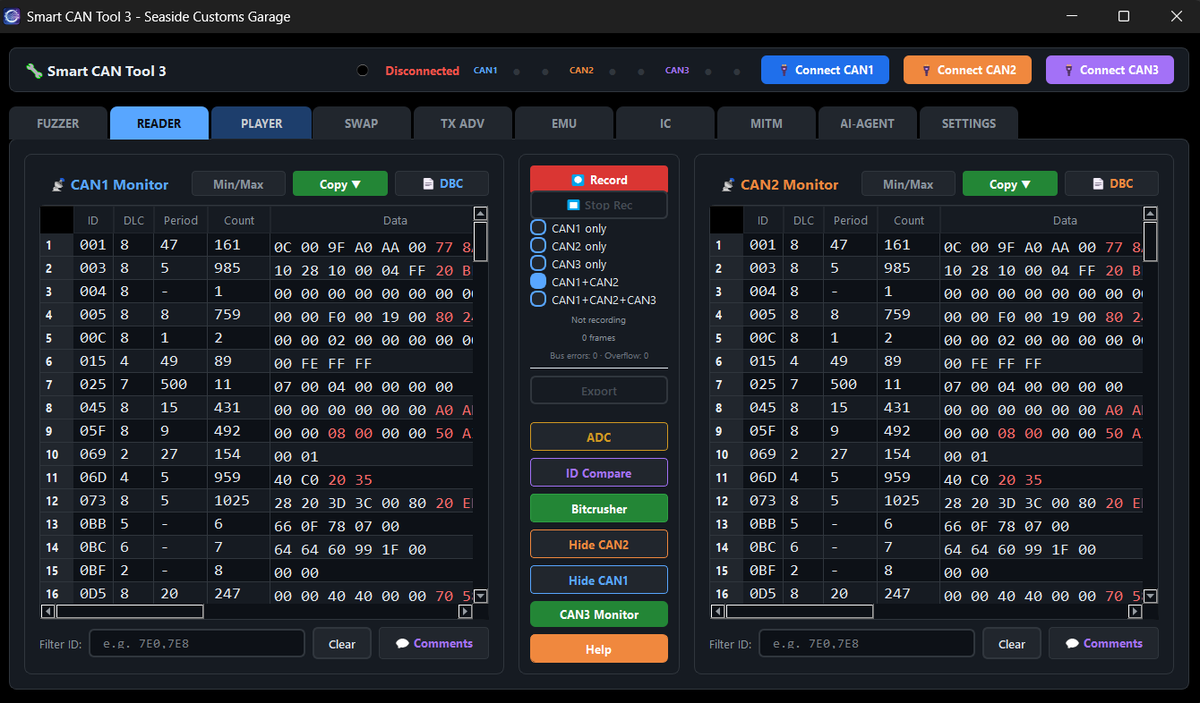
You connect the interface and see all the traffic on 1–3 buses. Changing bytes are highlighted, Min/Max shows which IDs react when you press the pedal or turn the key. DBC and J1939 decode instantly. Bitcrusher breaks the signal down to bits. Save to CSV.
You take the recording to the workshop and play it to the controller on the desk — no car, no lift. You pick the ID, channel, speed. It also loads logs from SavvyCAN, ECUMaster, CANHacker/PCAN, Vector ASC and candump.
FUZZER sweeps ID and data ranges and detects the controller's responses. SWAP substitutes data in frames to check what the receiver reacts to.
Two interfaces, one button: SCT3 becomes a transparent bridge between the tester (or module) and the car. You filter, modify frames on the fly, log traffic in both directions. In parallel, ADC adds up to 6 analog sensors to the same timeline.
You flash the finished frames into a hardware emulator (a reflashed CANable 1.0), which then runs in the car without a computer. The virtual IC cluster shows whether RPM, speed and temperatures look the way they should. TX ADV transmits from 10 slots with counters, CRC and parity — for controllers that check whether a frame is "genuine".
What PRO and ENTERPRISE pay for
You get READER, FUZZER and PLAYER free in SavvyCAN. You pay for what comes after watching.
You connect CAN1 to the tester, CAN2 to the car, click MITM. From then on you see every frame in both directions and can pass it, hold it or change it before it reaches the target. No scripting. This is what you want when you need to know "what the tester says to the controller" — and to check what happens when it says something else.
The frames that worked on the bench you flash into the same CANable 1.0 you use for diagnostics — just reflash it with the flasher built into Smart CAN Tool, no external tools. The interface prepared that way stays in the car and mimics the missing module, while the computer goes back to the workshop.
Instead of reading hex, you look at a tachometer, speedometer and temperatures. Vehicle presets set the right IDs and scaling. The fastest way to check whether what you transmit looks like a real engine to the cluster.
An Arduino Uno or Nano, firmware flashed from the ADC window (no Arduino IDE), 4 analog inputs 0–5 V and 2 frequency inputs for Hall sensors. Six channels, 100 Hz by default, the same timestamp as the CAN frames. You see how the voltage from the throttle position sensor or wheel pulses translate into bytes in a frame — on one chart. For learning there's a separate SIM firmware.
What it runs on
We don't sell an interface and don't require a specific one. Smart CAN Tool 3 supports what you probably already have in a drawer.
| Interface | Protocol / driver | Notes |
|---|---|---|
| CANable 1.0 with firmware candlelight | gs_usb, natively | Recommended. Exactly this type is required for CAN3. |
| Other adapters SLCAN (USBtin, Lawicel-compatible) | COM port | 83 / 125 / 250 / 500 / 1000 kbps |
| J2534 PassThru — Tactrix OpenPort 2.0, Drew Mongoose Pro GM II, Bosch VCI | manufacturer DLL | one channel; 32-bit drivers |
| CANable 1.0 as an emulator (EMU) | emulator firmware (flasher in SCT3) | to samo CANable 1.0 co do diagnostyki — przeflashowane wbudowanym w Smart CAN Tool flasherem |
| Arduino Uno / Nano (ATmega328P) | USB-UART | required for ADC; firmware from the app |
What we don't support — so there are no surprises:
Windows 10/11 · a USB port for the interface · two interfaces for PRO (MITM/CAN2), three for CAN3
Perpetual licence
You pay once. The key is tied to the computer, but you move it yourself: Deactivate on the old one, enter it on the new one. Offline the program runs for 20 launches or 7 days. Updates included.
Check whether you can see your car.
Sniffing, playback, fuzzing on one channel.
MITM gateway, 2 channels, ADC sensors.
Emulators, cluster, 3 channels, TX with CRC.
Check before you download
Honest about the risk: sending frames to a live vehicle can damage a controller. That's why READER and PLAYER on the bench are safe, and every transmitting function shows a warning in the app. If you don't know what a frame does — don't send it to a customer's car; send it to a controller on the bench first.
Questions we get most often
DEMO has no time limit and shows the full READER on one channel. All you need is a CANable 1.0 and 10 minutes. If you see what you're looking for — the rest of the tiers are one key away.